A generic payroll document may work in some cases, but many businesses need something a little more tailored. Different industries pay employees differently, track different details, and manage payroll in different ways. That’s why knowing how to customize a pay stub template can make payroll records far more useful.
A good template should not feel rigid. It should be flexible enough to reflect the way your business actually handles compensation. Whether you run a retail store, a consulting firm, a construction company, or a freelance business, customization helps turn a standard template into a practical payroll tool.
Why Customization Matters
At its core, a pay stub is meant to document how someone was paid. But the way payment is structured varies from industry to industry.
For example:
- A retail employee may have hourly wages and overtime
- A consultant may have fixed monthly compensation
- A contractor may be paid per project
- A hospitality employee may receive tips or variable shifts
If your pay stub template doesn’t reflect the way income is earned, it may feel incomplete or confusing.
That’s why customization is so important — it helps make the document more accurate, readable, and useful.
Start With the Core Payroll Fields
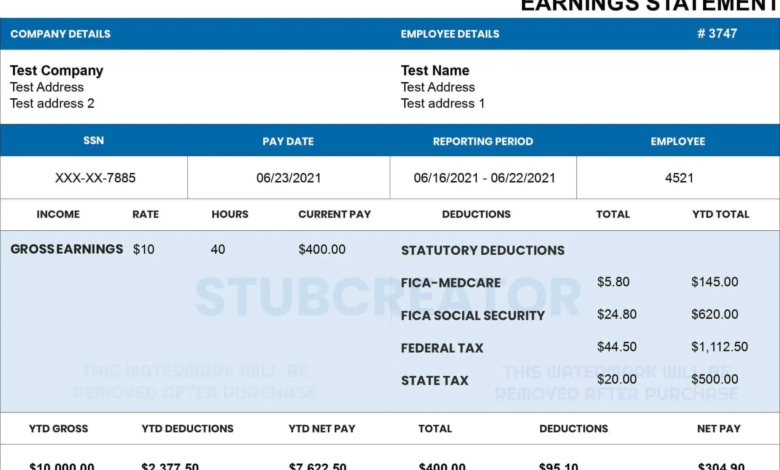
No matter the industry, there are certain details every pay stub template should include.
These usually include:
- Employee or worker name
- Employer or business name
- Pay period
- Gross pay
- Deductions
- Taxes
- Net pay
These are your foundation. Once those basics are in place, you can begin tailoring the template to your specific business model. Creating payroll records becomes easier with a professional paystub creator that ensures proper formatting and calculations.
Add Fields Based on How You Pay
The easiest way to customize a pay stub is to think about how compensation works in your industry.
For hourly businesses:
Add fields for:
- Hours worked
- Overtime
- Hourly rate
For salaried teams:
Focus on:
- Fixed pay periods
- Bonus sections
- Standard deductions
For freelance or project-based work:
Include:
- Project name or invoice reference
- Service period
- Agreed payment amount
For industries with variable earnings:
Consider adding:
- Commission
- Shift differentials
- Tips
- Performance incentives
The goal is to make the template reflect your actual payroll process instead of forcing your payroll into a generic format.
Keep the Layout Clean
Customization should improve usability — not make the pay stub cluttered.
One common mistake is adding too many sections just because they “might” be useful later. But if a field is rarely used, it can make the document harder to read.
A better approach is to keep the structure simple and only include fields that are relevant to your industry or payment setup.
The cleaner the layout, the easier it will be to update and understand.
Use a Format That Supports Flexibility
Some template formats are easier to customize than others.
For example:
- Word templates are great for layout and text editing
- Excel templates are useful if calculations change often
- PDF templates work best when you want a polished final document
Choosing the right format makes customization much easier over time.
If your payroll needs change often, a flexible format can save a lot of effort later.
Review It Like an Employee Would
Once you customize your paycheck stub template, read it from the employee’s perspective.
Ask yourself:
- Is it easy to understand?
- Can someone quickly identify earnings and deductions?
- Does it clearly explain the payment breakdown?
A customized template should still be simple enough for anyone receiving it to understand without confusion.
That balance between customization and clarity is what makes a template truly effective.
A Practical Way to Get Started
If you don’t want to build a pay stub from scratch, starting with a clean base template is often the easiest option.
Many businesses prefer to begin with a structured layout and then customize it based on their payroll style or industry needs. If you’re looking for a practical starting point, StubCreator offers free pay stub templates that can be adapted for different business types and payroll setups.
Final Thoughts
A customized pay stub template can make payroll documentation more accurate, more professional, and much easier to manage. The key is to keep the structure clear while adjusting the details to match how your industry actually works.
When your payroll records reflect your real payment process, they become far more useful over time.
Also Read:
How Many Working Days In 2026
Hobby Lobby Employee Portal Login
How Long Is a Business DayFIT Taxable Wages Explained